Saturday, 13 March 2021

Feedback & User Experience Testing

 Hi,

In this blog, I will be looking at the feedback I got and I will comment on this.


Feedback & User Experience Testing


From this feedback, I can see that most people chose "Excellent". There is also an audience that chose "Good" so I may try to improve my homepage by taking a look at the font of my texts.

///
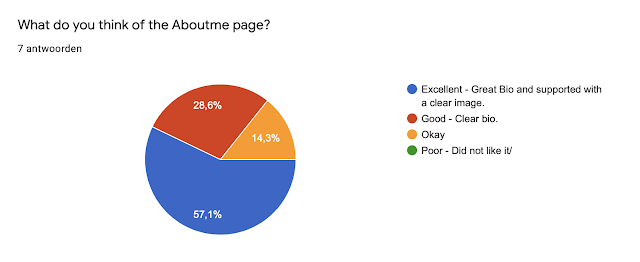
From this feedback, I can see that the majority has chosen "Excellent" however there are a lot of votes for "Good" and "Okay". So, I will try to improve my self by changing the biography and perhaps make changes in the font.

///
Once again the majority has chosen "Excellent" however a lot of people chose "Good" and "Okay". The reason for this might be that my project is not completely finished and therefore I have not uploaded it completely yet. Once the Editorial is completely uploaded I will make sure to improve the "Portfolio Page"

///
From the feedback, I can see that the menu bar is clear and easy to find.

///
The feedback shows that the "Contact me" page is evident and it does not need any improvements.

///
Even though the majority chose "Excellent" the audience that chose "Good" is also big so, after all the feedback I got I will make sure to make improvements.

///
From the poll, I can see that the majority has given feedback from their phones. So, I will make sure to make the improvement for the users that visit my website from their phones. I was mainly focused on how it looked from the laptop which is why I will now focus more on how my website looks from a Mobile phone.

///
I got some positive additional feedback and some tips. Now that I looked at all the feedback, I now know where to make improvements and how to do this better.

///


Creating Feedback & User Experience Testing Form

 Hi,

In this blog, I will be posting about the creating of the Feedback & User Experience Testing form for my website.


Creating Feedback & User Experience Testing form


We had to search ''Google form'' on google and then click not it, once I did that this is how the page looked like then, I clicked on ''Personal''.

///
Then I clicked on "Blank" and started to create my own form.

///
I gave the form a name which is "Feedback & User Experience Testing".

///
I also added a form description "Your feedback will help me improve, thanks for completing the form".

///
Then, I added 8 question as the tutor has told us to.

///
Once the form was completed I copied the link so that I could add this to my website.

///
On my website I clicked on site Menu in order to add the link.

///
Then I clicked on this Icon which says "Add link".

///
After that, I chose "Web address" and pasted the link that I copied earlier.

///
Then, I had to make sure that I chose "New window" so that the link would open on a new window.

///
I then, gave the window a name which is in this case "Feedback"

///
Then it showed on my menu bar and once you click on it, it takes you to the Feedback & User Experience Testing form.


Reference


Publishing my Website

 Hi,

In this blog, I will be posting the process of me publishing my Portfolio Website.


Website

For this exercise, we needed to upload our project, even if it is not done yet we were told to post something so, I decided to upload the cover of my Editorial to the flipbook.

///
 I clicked on upload and chose the cover of my editorial.

///
Then I added the name of my editorial and also chose ''No fold''.

///
After I uploaded it to the flipbook, I adjusted the size a little and this is how it looked.

///
Before publishing my website, I also looked at how it looks when you go to my website on a phone.

///
I realised that the size of the ''Contact me'' was a little too big and was not centred so, I adjusted this.

///
I checked the menu bar too, and everything looked fine so I did not have to change anything of it.

///
I checked everything again and liked how it looked.

///
Then, I clicked on ''Publish'' and published my website.


Reference


Saturday, 6 March 2021

Final Cover (name)

 Hi,

In this blog, I will be changing the name of the editorial after the tutor has informed me that the previous name ''CALAMITY''  is not really suitable for a Fashion editorial since this means disaster.

So instead, I chose the name ''TOMORROW''

The reason I chose this name was that it can be used as in ''The fashion of tomorrow/future''


TOMORROW

I clicked on the text that said ''CALAMITY'' and changed it to 'TOMORROW''

///
I also changed the paragraph into a headline supporting text, which is ''The editorial of yesterday, today, and tomorrow.''

///

FINAL COVER


This is the final result of my Fashion editorial cover.


REFERENCE


Critically evaluating my website

 Hi,

In this blog, I will be critically evaluating my blog by answering the following questions.


PLANNING STAGE

What were your initial ideas for creating a website?

I knew that I wanted my website to reflect my personality and immediately make people understand that I am interested in Fashion.

        Do you have a tagline on your website?

Yes, it says ''Your guide to Nisa's latest work and entertainment'' which will let the viewers know what to expect.


RESEARCH

Which designers/artist, websites did you look for inspiration?

DAZED, I also looked at this website to create my major project which is a Fashion editorial. The reason I got inspired by this website is that it really speaks to teenagers and that is the audience I would like to attract.

How many pages did you want to make on your website and why? Did that change as you progressed onto the research/ designing stage?

4 pages, these pages include Homepage, About me, Portfolio, and Contact me.


CONTENT

What is the purpose of your website?

The purpose of my website is to use it as a reference to my work. This will also help me succeed whenever I apply to a university or job.

Who are your potential website users?

People that might be interested in my work or when someone is hiring who might be looking for certain criteria's.

Who do you think is important to have a digital portfolio website?

Artists, Art students, Architect students, engineering students. 


Friday, 5 March 2021

Photo for About me page: class task

 Hi,

In this blog, I will be showing the process of me taking my portrait photo for my about me page. 

This is a class task we must do, so even if I already have a picture for my About me page I still have to do this task to upload on my blog.


Process


I tried to set up a place where I could put my phone to take the images on my own. I made sure that the background was plain. In this way, nothing would bother the image.

///
Then I made sure that I was in the frame and my shoulders were also showing, just like we were told to do during class.

///
I put a timer on of 3 seconds so that in this way I could take the picture without using my hands.

///
Then, just like the video during class showed us, I clicked on my face and adjusted the brightness with the yellow sun showing on the screen.

///
After taking the picture I used VSCO to sharpen the image.

///


FINAL RESULT

This is the final result of the image I took during class for our photograph task. As I said before I already have an image on my ''About me page'' this is just to complete my class task.


Reference


Monday, 1 March 2021

Developing major project: class task

 Hi,

In this blog, I will be showing the outline I created for my editorial during our Digital art session.

Outline

I started with a blank template on Lucidpress.

///
Then, I added a text by using Text>Heading.

///
After that, I added a shape to show the places of my images and add texts to it.

///
///

FINAL OUTCOME


This is the final outcome of my outline for the first page, due to the short time we are given I have only been able to complete the first page. The further process will be uploaded. 


REFERENCES


FINAL RESULTS PROJECT "ANCESTRAL REVOLUTION"

 ANCESTRAL REVOLUTION 2D ANCESTRAL REVOLUTION 3D https://nisanurdmu.wixsite.com/portfolio